


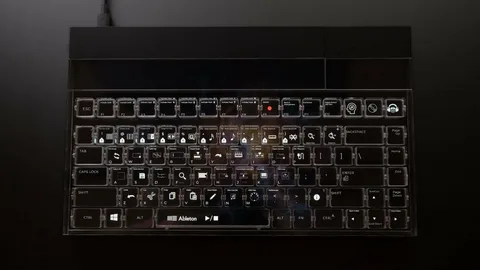
In today’s fast-paced digital world, efficiency is everything. Whether you’re a content creator, programmer, designer, or office professional, having the right tools can significantly enhance productivity. One innovative tool gaining popularity is a keyboard with display. This device combines the traditional keyboard with a dynamic display, offering features that can transform how you work.
What Is a Keyboard With Display?
A keyboard with display is more than just a standard typing device. It integrates an LCD or OLED screen directly into the keyboard, allowing users to access real-time information without switching screens. These displays can show app shortcuts, notifications, system stats, or even interactive content, giving you quick access to tools that were previously buried under layers of menus.
Benefits of Using a Keyboard With Display
1. Increased Productivity
Switching between applications and tools can slow down your workflow. With a keyboard with display, you can streamline these actions. For example, you can assign shortcuts to frequently used apps, monitor emails, or even control music playback directly from the keyboard. This reduces the need to constantly toggle between windows, saving precious time.
2. Enhanced Customization
One of the most appealing aspects of a keyboard with display is its customizable interface. Users can design personalized layouts that suit their workflow, whether it’s coding, video editing, or graphic design. Having essential tools and commands at your fingertips minimizes errors and boosts efficiency.
3. Real-Time Feedback
Some keyboards with displays offer real-time feedback on your work. For instance, developers can see code snippets or system statuses without leaving their text editor, while video editors can preview timeline markers and playback settings instantly. This immediate access to information can significantly accelerate decision-making.
Who Can Benefit the Most?
While virtually anyone can benefit from a keyboard with display, certain professionals find it especially valuable:
- Programmers: View function references, debugging info, or terminal commands directly on the keyboard.
- Designers & Creators: Control software palettes, timeline tools, and shortcuts without interrupting creative flow.
- Business Professionals: Track notifications, manage emails, and monitor productivity apps seamlessly.
Conclusion
A keyboard with display is more than a tech gadget—it’s a productivity enhancer. By centralizing essential information and controls, it reduces distractions, streamlines workflows, and allows professionals to focus on what truly matters. For anyone serious about optimizing their workspace, investing in a keyboard with display can be a game-changer.
